

Anytime you were using an app with high performance, buttery-smooth animations, and it even runs seamlessly offline, there’s a good chance you were using a native app. Even after using such native apps on a day-to-day basis, very few people truly know about native app development.
So, what is native app development?
Native app development helps create apps specifically catered to an operating system. Be it Android or iOS, developers work with specialised tools and technologies to create a platform-specific app. If your target audience is spread across both OS, developers opt for two different codebases.
In this guide, we’ll break down the native app development process, its key benefits and drawbacks, and so much more. So, let’s not beat around the bush any longer and jump right into it!
What Is Native App Development? – Including Real-World Examples
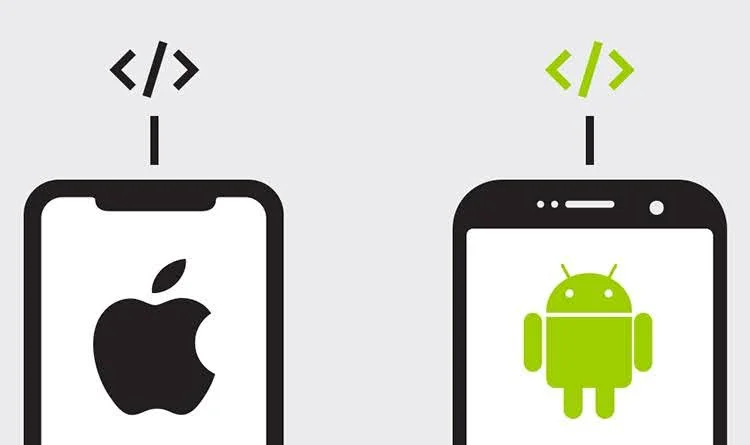
Native app development is the process of building apps specific to a single operating system. Typically, native apps are created for either Android or iOS, each requiring a unique development approach.
This means an iOS and Android version of the same application are generally developed separately, using the respective platform’s development environment.
Native apps are often considered superior because of their exclusivity to a single platform. Such apps aren’t just highly optimized for performance, but they also have full access to device hardware.
By now, you probably have received the answer to what is native app development. However, now, you may wonder, how exactly do native apps offer such smooth operations as well as reliability?
To answer this, we need to take a deeper look at the development process of native apps.
Native App Development Process
Simply put, native apps are built in such a way that they can directly communicate with the operating system and the device’s native capabilities.
And, to make this possible, developers require a specific programming language and official software development kits (SDKs) for each operating system.
Typically, developers use Swift within Apple’s Xcode environment for iOS and Kotlin within Google’s Android Studio for Android apps. This allows businesses to offer their apps on different platforms with their native implementation.
However, a development environment includes so much more than programming languages. The interfaces of such apps require Native UI frameworks to ensure the correct interaction patterns that users expect from their particular device.
Developers use these frameworks for their pre-built components for elements such as navigation, buttons, menus, animations, gestures, and accessibility features.
More importantly, native development gives developers access to the operating system’s APIs. These APIs act as a bridge between the application and device features. Thus, reducing the need for a third-party layer.
These little technical aspects add up to deliver a high-performing and consistent app that is complementary to the device’s operating system, hardware, and overall user experience.
Examples Of Native Apps
- Spotify
- Google Maps
- Uber
- Duolingo
6 Benefits Of Native App Development
Simply knowing what is native app development isn’t enough. To make a well-informed decision, you need to understand what are the benefits or drawbacks of native app development.
So, let’s start by looking at the different types of perks that come with native development.
1. Superior Performance
To begin with, native app development offers far better performance than any other development approach. This is because they’re developed to cater to specific devices’ hardware and operating systems.
With native apps, you’re most likely to get a faster launch and response time. Moreover, their development method ensures better handling of complex computations.
Furthermore, with native apps, you don’t have to rely on abstraction layers between the device and your app. This results in quicker load times and smoother animations and transitions.
2. Enhanced User Experience
Native development makes it easier to follow the standard designs and interaction patterns of individual platforms.
So, users are already accustomed to the general navigation structure of your app. Moreover, this helps maintain consistent behavior with other apps on the device and provides better accessibility support.
All in all, users are guaranteed a very natural iOS or Android experience. Eventually, you will notice higher user satisfaction, engagement, and retention.
3. Better Access To Device-Specific Features
A major perk of native development is the ability to make the best out of a device’s hardware and operating-system capabilities. Hence, native apps can very easily integrate with the device’s integral apps as well as other non-essentials.
For example, compared to cross-platform apps, a native app can more simply integrate with Camera, GPS, Bluetooth, NFC, Biometrics, local storage, and so much more.
These apps can also smoothly collaborate with more complex integration such as AR capabilities or health and fitness sensors. This becomes particularly valuable for apps that depend heavily on hardware functionality.
4. High Security, Stability, And Reliabilty
Native apps are generally developed with platform-specific encryption abilities and highly secure storage APIs. This is a key reason why native development is the go-to for banking or other apps that require advanced security.
Beyond their advanced security, native apps tend to be very stable and consequently, reliable. With native apps, developers have greater control over how the application interacts with the operating system
This means fewer compatibility issues or unexpected UI behavior, and more predictable and consistent performance.
5. Offline Functionality
We can’t truly emphasize the benefits of native apps without mentioning their offline functionality. These apps can store data locally on a user’s device, thus offering a very reliable offline experience.
This means users can access important features even when they have limited or no internet connectivity at all. This is particularly useful for navigation,, healthcare apps, or any apps where users may need access to information at all times.
6. Better Support For Complex And Resource-Intensive
Lastly, the overall benefit of native development is the robust support they provide to highly complex or resource-intensive apps.
Native apps tend to outperform cross-platform apps in performance, heavy animations, memory management, and security and compliance. This makes them the perfect choice for apps with advanced requirements like AR/VR apps, healthcare apps, IoT apps, and so much more
4 Disadvantages of Native App Development
Like everything else, native apps also have ups and downs. Thus, despite their outstanding service, native apps can sometimes be tricky and present users a few challenges here and there.
So, now, let’s take a look at the disadvantages of native app development.
1. High Development Cost
A key reason why a lot of businesses deviate from native development is the high development costs.
Since native apps have to be built separately for each operating system, it ends up costing a very hefty amount. Ultimately, it means businesses may need different codebases, developers, and testing processes, increasing overall development and maintenance costs.
Moreover, you might even need to hire separate development teams for iOS and Android development, thus adding to costs even more.
2. Long Development Time
Needless to say, if you’re developing an app for two separate OS, the development time would be significantly longer than cross-platform apps.
Native apps, in general, require a longer development time, and on top of that, if your app requirements are very complex, developers would need additional time. Thus, you have to factor this in beforehand.
And it’s not solely about the initial development phase. Native apps have to be tested separately on every device. This further extends the overall time before you can finally launch the app.
3. Complex Maintenance
Another downside of native apps is how challenging it is to maintain them. Developers have to maintain multiple codebases, which makes bug fixes, updates, and feature releases much more complicated.
In fact, the changes made to one platform may need to be separately implemented and tested on the other. So, even after the development phase is over, developers would have to put in consistent effort to keep your app secure, updated, and user-friendly.
4. Platform-Specific Expertise
Lastly, to build any sort of native app, you would need developers with platform-specific expertise. They are expected to have specialized knowledge of the target platform, programming language, frameworks, and development tools.
With native app development, teams have to stay updated with platform-specific APIs and OS changes. And, creating such a team can be challenging, especially when it comes to finding developers with the right skills.
This adds to the overall cost and challenges of managing a native app development project, especially if your app needs to support both iOS and Android.
How Much Does It Cost To Develop Native Apps?
If you’re truly thinking about investing in native apps for your business, you should be aware of their costs from the start.
As we have already mentioned, native apps can be a little more expensive than cross-platform apps. However, the budget also varies depending on your app requirements as well as your business goals.
For your ease, we have compared the prices of native apps based on their complexity levels in the table below. This should give you a proper idea of what you’re signing up for!
| App Complexity | Development Timeline | Key Features | Price Range |
| Simple Native Apps | 3-6 Months | Simple login, push notifications, and user profile | $30,000 – $80,000 |
| Moderate-Level Native Apps | 6-9 Months | Payment gateways, real-time location, APIs, dashboards | $90,000 – $200,000 |
| Complex Native Apps | 9-12+ Months | Complex backend logic, customised animations, and advanced security | $200,000 – $500,000 |
Native Apps Vs Cross-Platform Apps Vs Hybrid Apps
A common confusion among businesses is what exactly the difference is between the different types of apps there are. Whether it is native, cross-platform, or hybrid apps, people often don’t know how their services and performance vary.
Thus, when choosing a specific type of app, they end up making a mistake. So, for a deeper understanding, we are now going to explore cross-platform and hybrid apps and compare them with native apps.
Cross-Platform Apps
Cross-platform apps tend to have a much simpler development approach. The apps are built with a single, shared codebase and even User Interface (UI). So, developers don’t have to work on each operating system separately, and still offer a near-native performance.
Thus, it saves a lot of the bulk of the work, decreasing many of the development hours that would be required for native apps.
Moreover, it isn’t just about the initial development phase. Cross-platform apps are also much easier to maintain and update! Overall, the budget is significantly lower too.
Hybrid Apps
Simply put, hybrid apps are basically web-based apps. They are developed with common web technologies like HTML or JavaScript. Then, they are wrapped with a layer of a native container.
This means hybrid apps provide all the benefits of a common web app, but more importantly, they can also access all native features.
And, just like cross-platform apps, hybrid apps also rely on a single codebase.
Native VS Cross-Platform VS Hybrid Apps
| Factors | Native Apps | Cross-Platform Apps | Hybrid Apps |
| Basic development approach | Built separately for a specific platform using its native technologies | One shared codebase is used to build apps for multiple platforms | Web technologies are packaged inside a native container |
| Common technologies | Swift/SwiftUI for iOS and Kotlin/Jetpack Compose for Android | Flutter, React Native, .NET MAUI | Ionic, Apache Cordova, Capacitor |
| Platforms | Developed separately for iOS and Android | iOS, Android, and potentially other platforms from a shared code | iOS, Android, and web |
| Code reusability | Low | High | Very high |
| Performance | Excellent | Very good | Good for simpler apps |
| User experience | Best platform-specific experience | Can closely match native UX | May feel less native during complex interactions |
| Security | Strong platform-level control | Very good | Good, implementation requires extra consideration |
| Development speed | Slower when building for multiple platforms | Fastest due to shared code | Moderately fast, specially for simple apps |
| Development Cost | High | Moderately low | Lowest of the three typically, particularly for simpler apps |
| Best for | High performance, strong security requirements, or deep customisation needs | Businesses wanting a balance of cost, performance, and multi-platform reach | Content-driven, business, MVP, and relatively simple applications |
When Should You Opt For Native App Development?
By now, you probably know all that there is to know about native app development. However, we would like to leave you with one crucial piece of information, that is, when exactly should you choose native development?
Choose native app development if
- High performance is critical for your app.
- You need extensive hardware access.
- User experience is a top priority for you.
- You need strong offline capabilities.
- Security and compliance are a major concern.
- You plan on investing in a long-term, scalable product.
- Your target audience is primarily on a single platform, either iOS or Android.
- Your app has highly complex or specialized needs.
When should you not choose a native development approach?
- You have a limited budget.
- You need the app to be launched as soon as possible.
- You want to target multiple platforms without too much hassle.
- You have simpler requirements or just want an MVP.
- You don’t really need extensive device integration.
Partner With App-Concept For Native App Development
Native app development doesn’t have to be complicated. With the right development, the process can be simplified and specifically designed to cater to your business needs. And this is exactly where App-Concept comes in!
App-Concept is a top-tier development agency based in Germany, and they have worked with a diverse client base over the last decade.
Hence, using their expertise across the full development life cycle, they can help businesses turn fresh app ideas into reliable, scalable, and user-centred apps!
App-Concept can help you build a native app through thorough research of your business plans and target users. Their native development approach allows businesses to benefit from platform-specific capabilities and helps them provide a highly intuitive experience. So, what are you waiting for, Contact App-Concept Now!
Frequently Asked Questions
Q. Is native app development better than cross-platform development?
No, not necessarily. Whether a native app or cross-platform app is better depends completely on your unique needs and long-term plans.
Q. Is native app development expensive?
Yes, native apps can be more expensive compared to cross-platform or hybrid apps. However, the high performance or extensive device hardware access gets you your money’s worth.
Q. How long does it take to develop a native app?
There isn’t one specific timeline for all types of native apps. The timeline depends on the app’s complexity, features, operating system, and even the development team. However, generally, they tend to have a longer development time than cross-platform apps.
Over to You
So, native app development is a development approach that allows businesses to offer highly optimized mobile experiences for specific platforms. To build such apps, developers rely on platform-specific tools and technologies to create an app for separate operating systems.
Remember, native apps can be an excellent choice for some companies. They offer many advantages, such as high performance, smooth UX, offline capabilities, and strong security.
However, that doesn’t mean it is the right option for you. You need to make a decision based on your business goals and what suits you best. Hopefully you’ll be able to build the best app for you.


